Google Chat Bot Integration
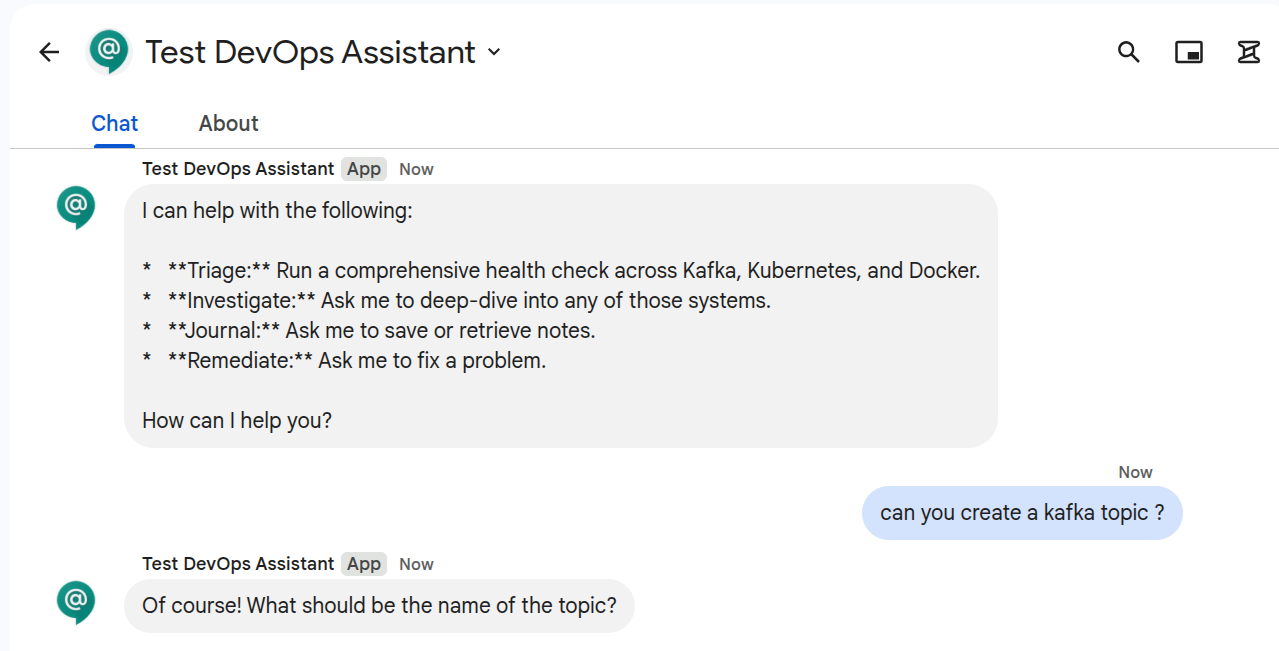
The Orrery platform ships a Google Chat integration that supports thread-based session isolation, email-based RBAC, and human Approve/Deny flows for guarded tools for guarded tools.
Google Chat supports two ways of connecting to your bot. Choose the one that best fits your infrastructure:
flowchart LR
    subgraph HTTP["HTTP Webhook — public URL required"]
        GC1[Google Chat] -->|POST + JWT| ING[Public Ingress]
        ING --> B1[orrery-bot]
    end
    subgraph PS["Pub/Sub Pull — private network friendly"]
        GC2[Google Chat] -->|publish| T[Pub-Sub Topic]
        T --> S[Subscription]
        B2[orrery-bot<br/>private network] -->|pull| S
end-
Standard connection for bots with a public URL (Ingress, Cloud Run, ngrok). Lowest latency.
-
Ideal for private networks (GKE). Bot pulls events from a queue; no public ingress required.
Shared Concepts
Regardless of the transport you choose, the following concepts apply to all Google Chat deployments.
Async Response Mode
Google Chat enforces a ~30 second synchronous budget on webhook responses. If an agent run exceeds this budget, the UI will show an error. Orrery solves this with Async Response Mode:
- Immediate Ack: The bot returns a
200 OK(emptyhostAppDataAction) immediately. - Progress card posted: A live "🔍 Investigating…" Card v2 is posted to the thread via the Chat REST API.
- Background run: The agent run proceeds. As sub-agents report in, the bot PATCHes the same card in place (
spaces.messages.patchwithupdateMask=cardsV2) — no thread spam. - Final result: On completion, the progress card is replaced with the final reply (see Progressive Cards below).
This mode is enabled by default (GOOGLE_CHAT_ASYNC_RESPONSE=true).
Turn timeout and shutdown
A deferred turn runs in a background task after its event was already acknowledged (HTTP 200, or the Pub/Sub ack), so nothing upstream will retry it and nothing upstream bounds it. Two settings close that gap:
GOOGLE_CHAT_TURN_TIMEOUT_SECONDS(default600,0disables) — the wall-clock budget for one turn. On expiry the run is stopped and the progress card is replaced with a notice instead of hanging on "Investigating…".GOOGLE_CHAT_SHUTDOWN_GRACE_SECONDS(default20) — onSIGTERM, the worker stops pulling, lets in-flight turns finish for this long, then stops the rest. Each stopped turn posts the same notice before it goes.
The notice states the one thing the reader cannot reconstruct: which guarded changes already went through. It comes from a per-turn tool ledger (ToolLedgerPlugin) that records every @confirm/@destructive call that got past the gates, including calls made inside specialist AgentTools, and counts a call that was still running when the turn stopped as "may have happened". Without that list, "ask again" is how a scale or a restart runs twice.
A turn that ends with no text at all now says so (and logs a WARNING), rather than posting a bare (no response). One that raised an approval card without writing a sentence gets a short line pointing at the card.
Progressive Cards
For long-running investigations (incident triage, remediation loops), the bot streams progress live by updating a single message in place. The user sees the run evolve instead of staring at a blank thread for 60–120s.
What the progress card shows:
- Current step — the friendly label for the executing sub-agent (e.g.
Checking Kafka,Synthesizing findings). - Tool breadcrumb — the most recent tool call (
list_consumer_groups,get_pods, …) so operators can see what the agent is doing right now. - Specialists at work: one line per specialist consulted, with each of its tool calls and its state (⏳ running, ✅ done, ⚠️ failed, 🔒 awaiting approval or refused) and duration. This comes from the platform's
ProgressPlugin, so it includes calls made inside a specialist, which the card used to go quiet during. - Subsystem chips — one row per health-check subsystem that has reported in, with a severity icon inferred from the status text:
- ✅
ok· ⚠️warn(yellow/degraded/lag) · ❌fail(red/critical/crashloop) · ⏳pending
- ✅
- Remediation panel (when the remediation subgraph is running) — shows
remediation_action→verification_result→remediation_summaryas the act → verify → retry loop iterates. - Elapsed seconds — visible forward-progress signal.
Card updates are debounced at 800ms and force-flushed on each subsystem status write, and whenever a specialist finishes, to balance liveness against Chat's update quota.
Final result card (triage runs):
When the run writes kafka_status / k8s_status / docker_status / observability_status / elasticsearch_status / triage_report into session state (i.e. the triage pipeline ran), the progress card is replaced with a structured Triage Report card:
- Header — overall severity badge: 🟢 All systems healthy / 🟡 Degraded / 🔴 Critical.
- Subsystem sections — one section per subsystem with an icon and short summary.
- Summary — the
triage_summarizeroutput. - Remediation shortcut — when overall severity is
warnorfailand the viewer is anoperatororadmin, the card offers remediation: a 🔧 button (CARD_CLICKED→run_remediation) whenGOOGLE_CHAT_INTERACTIVE_BUTTONS=true, else an invitation to reply remediate in the thread (Pub/Sub-safe). Either fires the remediation flow in the same session, reusing the triage report already in state. RBAC is still enforced server-side at tool time — this is just a UI shortcut.
For non-triage queries (e.g. "what's the Kafka lag?"), no subsystem chips land, so the progress card falls back to a plain text/markdown final reply and the remediation hint is not shown.
Failure modes handled:
- If
update_messagehits 404/410 (message deleted), subsequent updates are skipped silently. - If a later update fails for another reason, the final reply falls back to a fresh
create_messageso the user still gets a result. - If the agent run raises, the progress card is overwritten with an error card — never left stuck on "Investigating…".
Authentication for Async Replies
Posting async replies requires a credential bearing the https://www.googleapis.com/auth/chat.bot scope.
- Local Dev: You must use a Service Account JSON key.
gcloud auth logincannot obtain this scope. - Production (GKE): Use Workload Identity. Leave
GOOGLE_CHAT_SERVICE_ACCOUNT_FILEunset and the bot will use ADC.
Role-Based Access Control (RBAC)
Identity is resolved from the user's verified email address.
| Role | Access | How to grant |
|---|---|---|
viewer | Read-only tools | Default |
operator | Read + @confirm tools | Add email to GOOGLE_CHAT_OPERATOR_EMAILS |
admin | All tools | Add email to GOOGLE_CHAT_ADMIN_EMAILS |
Interactive Guardrails
When an agent attempts a tool marked @confirm or @destructive, the bot posts a Card v2 describing the action (level, reason, arguments). The agent run is paused until a human decides. How the decision travels depends on the transport (GOOGLE_CHAT_INTERACTIVE_BUTTONS, default false):
- Reply-in-thread (default — the only mode that works over Pub/Sub). The card asks the operator to reply
approveordenyin the card's thread. A reply is a plainMESSAGEevent, which the Pub/Sub connection always delivers with the thread attached; the handler matches it against the thread's pending confirmation. Approve requires a deliberate word (approve,confirm,proceed,go ahead— a casual "ok"/"yes" is treated as normal conversation, not authorization); deny is broad (no,cancel,stop,abort, …). - Inline buttons (
true— HTTP endpoint deployments only). Real ✅ Approve / ❌ Deny buttons whoseCARD_CLICKEDevent carries the exactaction_id.
sequenceDiagram
    participant U as Operator
    participant B as Orrery bot
    participant LLM as ADK Runner
    participant T as Guarded tool

    LLM->>T: patch_deployment(args)
    T->>B: confirmation_required (callback short-circuit)
    B->>U: Card v2 — DESTRUCTIVE: patch_deployment<br/>Reply `approve` or `deny`
    U->>B: "approve"  (MESSAGE in the card's thread)
    B->>B: requester check → mark pending approved<br/>(latest pending in thread + args_hash)
    B->>LLM: synthetic prompt with original args
    LLM->>T: patch_deployment(args)
    T->>B: callback consults store →<br/>consume_approved(thread, tool, args_hash)
    T->>LLM: success
    LLM->>U: "Patch was successful."
Approval is requester-only and fail-closed: the decision (reply or click) carries the sender's verified email, and only the user who triggered the guarded action may approve it — anyone else's approval is refused in-thread and the pending survives. Deny is open to anyone (an accidental deny is harmless; anyone should be able to stop a destructive action).
Why buttons can't work over Pub/Sub. A button click is resolved by Google's Workspace add-ons runtime with a synchronous HTTPS round-trip: Chat invokes the app's deployment function (deploymentFunction: confirm_action in the gsuiteaddons logs) and must receive a valid response within the interaction window. A Pub/Sub pull app has no synchronous channel to answer on, so the click fails on Google's side — error code 3, "The Chat app didn't respond or its response was invalid" — before the worker can help it, and Chat posts "<bot> is unable to process your request" into the space. Google's own Pub/Sub quickstarts demonstrate only MESSAGE/ADDED_TO_SPACE/REMOVED_FROM_SPACE and note that dialogs and synchronous card updates are unavailable on this transport. Thread replies are immune: they are ordinary messages, delivered to the topic with the thread attached, answered asynchronously via the Chat REST API.
How the handshake survives across sub-agents. Many guarded tools (patch_deployment, restart_deployment, …) live on specialist AgentTool-wrapped agents. ADK gives those AgentTool invocations their own ephemeral session, so any per-context retry flag the callback might write would be invisible to the next invocation. The bot keeps the approval handshake on the platform confirmation store instead (orrery_core, shared with the Slack bot and the HTTP server; backend via ORRERY_CONFIRMATION_BACKEND), matching (scope, tool_name, args_hash) against entries the click handler has flipped to approved=True. The match is one-shot (consumed on retry) and is only valid for 120 seconds after the Approve click — a stale approval can't auto-execute a later request.
Argument fingerprinting. The store hashes the canonical JSON of the tool's arguments. If the LLM, on retry, calls the tool with even slightly different arguments than were shown on the approval card, the hash won't match and the bot re-prompts with a fresh card. Operators authorize specific arguments, not just a tool name.
Validity window. Approvals expire 120s after the click. Pending entries expire 300s after creation. Both are enforced at lookup time and pruned opportunistically.
Workspace Add-ons Mode
If your bot is a Google Workspace Add-on, it uses a different event structure and requires response wrapping. Orrery detects this automatically and uses the hostAppDataAction schema.
Service Agent Identity
Add-on tokens are signed by a project-specific service agent. Add it to your .env: GOOGLE_CHAT_IDENTITIES=chat@system.gserviceaccount.com,service-<PROJECT_NUMBER>@gcp-sa-gsuiteaddons.iam.gserviceaccount.com
Troubleshooting
- 401 Unauthorized: Check your
GOOGLE_CHAT_AUDIENCE(must match console exactly) andGOOGLE_CHAT_IDENTITIES. - 403 Forbidden: Your Service Account lacks the "Chat Bot API" or the
chat.botscope. - 404 Not Found: The bot couldn't resolve the space name from the event.