Slack Bot Setup
The platform includes a Slack bot that lets you interact with the DevOps agent directly from Slack. Each thread becomes a separate conversation, and guarded tools post interactive Approve/Deny buttons.
Setup
- Create a Slack app at api.slack.com/apps → Create New App → From manifest and paste:
{
  "display_information": { "name": "DevOps Agent" },
  "features": { "bot_user": { "display_name": "DevOps Agent", "always_online": true } },
  "oauth_config": {
    "scopes": {
      "bot": ["chat:write", "channels:history", "groups:history", "im:history", "app_mentions:read"]
    }
  },
  "settings": {
    "event_subscriptions": {
      "bot_events": ["message.channels", "message.groups", "message.im", "app_mention"]
    },
    "interactivity": { "is_enabled": true },
    "socket_mode_enabled": true,
    "token_rotation_enabled": false
  }
}
If you enable impersonation, also add the users:read and users:read.email bot scopes.
- Generate an App-Level Token (Basic Information → App-Level Tokens, scope:
connections:write) - Install to Workspace and copy the Bot Token
- Configure
agents/slack-bot/.env:
SLACK_BOT_TOKEN=xoxb-your-bot-token
SLACK_SIGNING_SECRET=your-signing-secret
SLACK_APP_TOKEN=xapp-your-app-token
GOOGLE_API_KEY=your-google-api-key
- Run:
make up                     # start infrastructure
make run-slack MODE=socket  # start the bot (Socket Mode, no public URL needed)
- Invite the bot to a channel (
/invite @DevOps Agent) and start chatting.
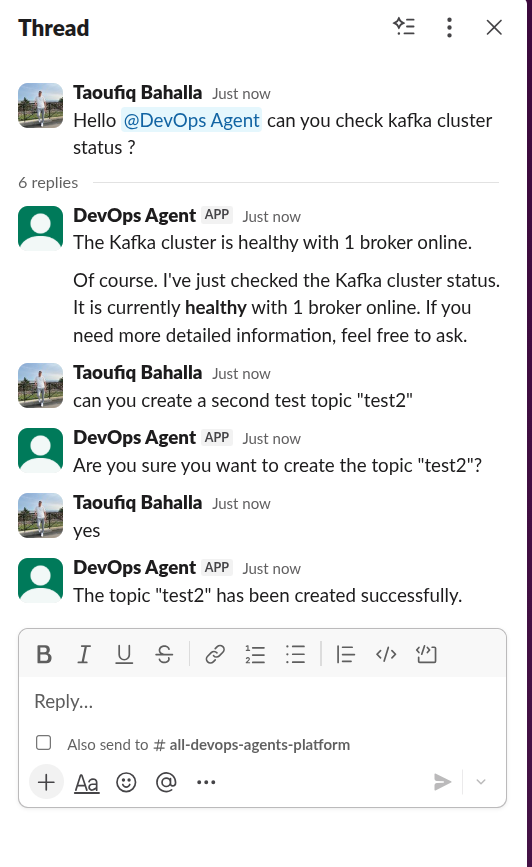
Each thread is a separate conversation. Guarded tools (marked with @confirm or @destructive) post an Approve/Deny prompt before executing. Approvals are requester-only (only the user who triggered the action can approve; anyone can deny), one-shot, pinned to the exact tool arguments, and expire after 5 minutes. The handshake rides the shared platform confirmation store — set ORRERY_CONFIRMATION_BACKEND=postgres (with DATABASE_URL) to share pending approvals across bot replicas. See Guardrails for the full flow.
Live progress on slow turns
A turn that takes more than a couple of seconds gets a status message in the thread, edited as the agent works. It lists each specialist consulted and its tool calls (⏳ running, ✅ done, ⚠️ failed, 🔒 awaiting approval or refused). When the turn ends, the status message becomes a one-line receipt, for example "✅ Kafka, Kubernetes · 4 tool calls · 7.2s", and the answer is posted below it as usual.
Quick answers, and turns that call no tools, add nothing but the answer. Edits are throttled to one every two seconds, within Slack's chat.update rate tier. They use the chat:write scope the bot already needs. A failed edit is logged and never costs the answer. Set SLACK_PROGRESS_UPDATES=false to turn it off.
Only names and outcomes are shown, never tool arguments or results.
Acting as the user
With impersonation enabled (ORRERY_IMPERSONATION), the bot resolves each sender's email through users.info so that Kubernetes and Elasticsearch see the person. Add the users:read and users:read.email bot scopes. Without them the lookup fails, and calls to impersonating systems are refused rather than made as the bot.
Role-Based Access Control
The Slack bot maps Slack user IDs to RBAC roles. Add your user IDs to agents/slack-bot/.env:
# Comma-separated Slack user IDs per role.
# To find your user ID: click your profile → ⋮ → Copy member ID
SLACK_ADMIN_USERS=U01ABC123,U02DEF456
SLACK_OPERATOR_USERS=U04XYZ789
| Role | Access | How to assign |
|---|---|---|
| viewer (default) | Read-only tools only | Any user not listed above |
| operator | Read-only + @confirm tools | Add user ID to SLACK_OPERATOR_USERS |
| admin | All tools including @destructive | Add user ID to SLACK_ADMIN_USERS |
The role is resolved on every turn, so an existing thread picks up a change. The role lists are read from the environment at startup: to test a different role, change the env var and restart the bot. No new thread is needed.
For a side-by-side walk-through of exercising each role from Slack, ADK Web, and the CLI, see Testing RBAC across surfaces.
See the full Slack Bot README for webhook mode, Docker deployment, and configuration reference.